
Azure DevOps - GatsbyJs Build Pipeline
Continuous Integration & Continuous Deployment for your GatsbyJS website using Azure Pipelines.
commit 4ea3897 · authored · amended · 3 min read

For long I was using Netlify to do CI/CD for this website and was using their free plan. But when they introduced the build minutes limit, I had to switch to another option.
Bad news 📰 in the morning
— Abhith Rajan (@AbhithRajan) December 17, 2019
New limit on #netlify build minutes.
Looking for alternative options! pic.twitter.com/W12MwlyOcn
I already have a paid account with SmarterASP.NET where I host Piggy and is very much suitable for personal side projects since it is very cheap. So I thought of moving back to SmarterASP.NET and for CI/CD Azure DevOps Build & Release Pipelines since am using the same at work.
Build Pipeline
We used the YAML based pipeline and steps are self-explanatory.
trigger:  - master
pool:  vmImage: "ubuntu-latest"
steps:  - task: NodeTool@0    inputs:      versionSpec: "10.x"    displayName: "Install Node.js"
  - script: |      npm install -g gatsby-cli    displayName: "Install gatsby-cli"
  - script: |      yarn install    displayName: "Install dependencies"
  - script: |      yarn build    displayName: "Gatsby build"
  - task: CopyFiles@2    inputs:      sourceFolder: "public"      contents: "**"      targetFolder: "$(Build.ArtifactStagingDirectory)"      cleanTargetFolder: true    displayName: "Copy built site"    condition: and(succeeded(), ne(variables['Build.Reason'], 'PullRequest'))
  - task: PublishBuildArtifacts@1    inputs:      PathtoPublish: "$(Build.ArtifactStagingDirectory)"      ArtifactName: "drop"      publishLocation: "Container"    condition: and(succeeded(), ne(variables['Build.Reason'], 'PullRequest'))    displayName: "Publish Build Artifacts"
This pipeline will run for pull request as well. In those cases we don’t need to build the artifacts. That’s why we put the below condition for CopyFiles@2 and PublishBuildArtifacts@1 tasks.
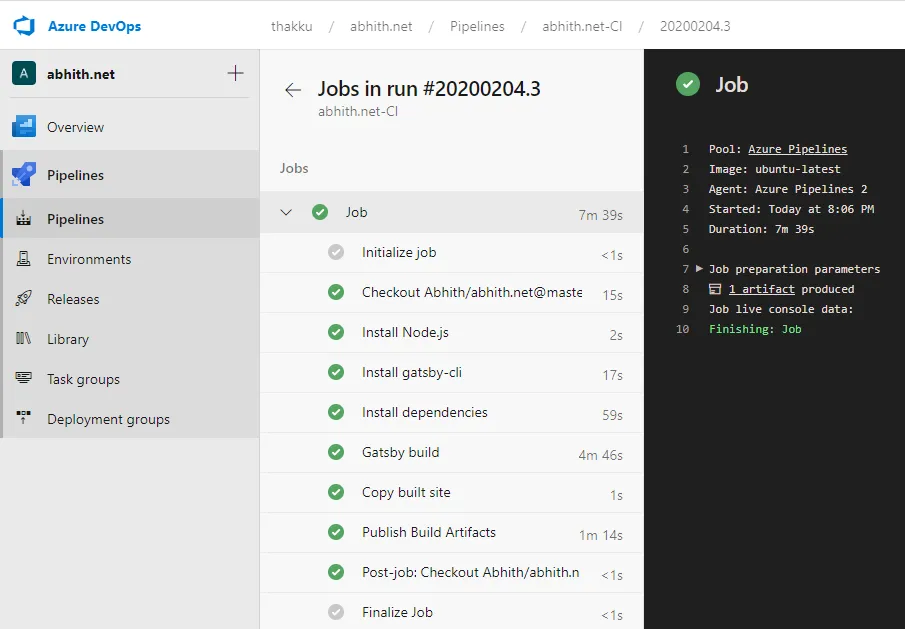
condition: and(succeeded(), ne(variables['Build.Reason'], 'PullRequest'))And a successfull build looks like,
Release Pipeline
Once we configured our build pipeline, created a release pipeline.
Build pipeline vs Release pipeline
A build is a pipeline that has no side-effects, it only takes in code and puts out compiled “artifacts”. A release is a pipeline that has side-effects, it takes in artifacts and publishes or deploys them to environments.
For the release pipeline, in case of SmarterASP.NET, the stage contain one job and it has only one task, the FTP Upload.
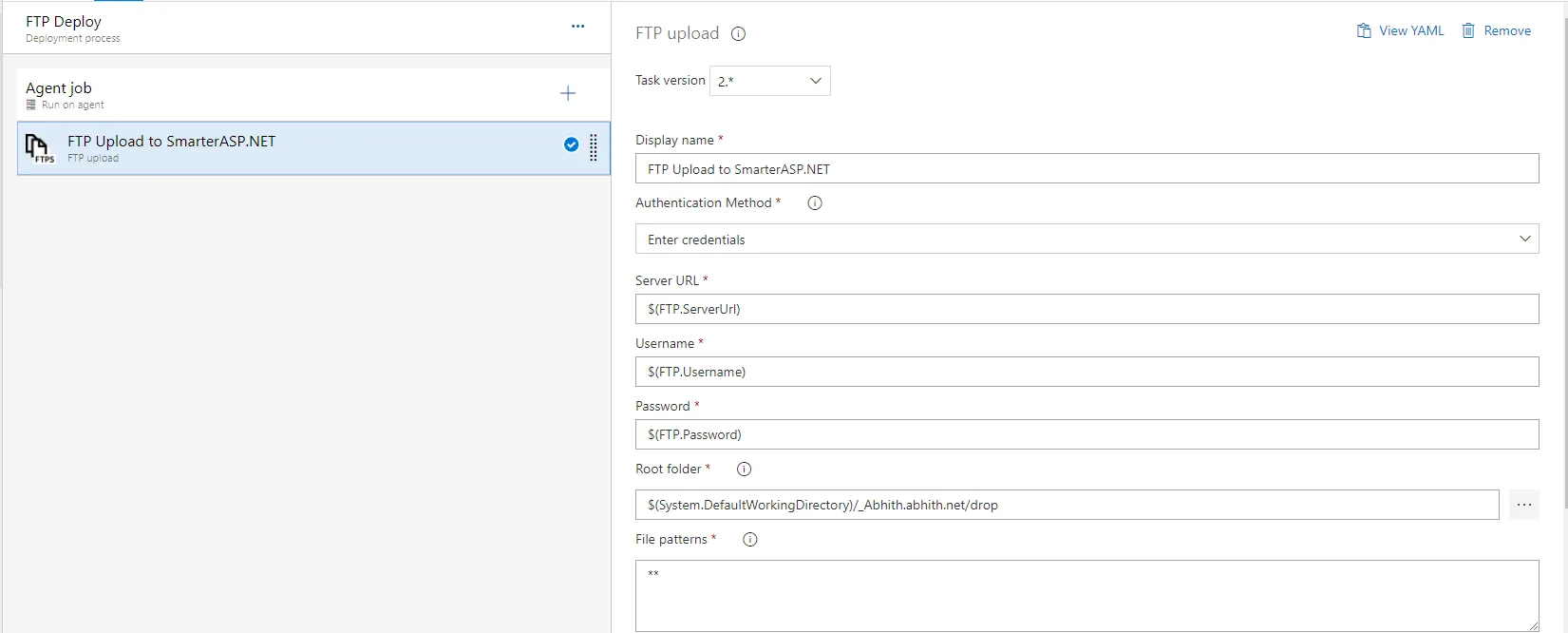
And the yml for the same look like below,
steps:- task: FtpUpload@2 displayName: 'FTP Upload to SmarterASP.NET' inputs: credentialsOption: inputs serverUrl: '$(FTP.ServerUrl)' username: '$(FTP.Username)' password: '$(FTP.Password)' rootDirectory: '$(System.DefaultWorkingDirectory)/_Abhith.abhith.net/drop' remoteDirectory: /sitefolder/ preservePaths: true trustSSL: true condition: and(succeeded(), ne(variables['Build.Reason'], 'PullRequest'))``Notes
- All the $(---) are pipeline variables
- rootDirectory can be browsed through the … button near to the Root folder text input (check the comments below)
Even though I have successfully configured the CI/CD. But the time it took to complete the deployment was too long since the artifact size was high. The gatsby-images generate so many versions of the image files resulting increase in the artifact size. So the FTP upload takes so much time to finish.
Tried #AzureDevOps to do the build and FTP upload task to push the artifact to @smarterasp, it worked fine but the time took to complete the release is almost 2 hrs. (artifact is around 500 MB in size & number of files 📂 around 3k). pic.twitter.com/wcltxbObRj
— Abhith Rajan (@AbhithRajan) December 27, 2019
Because of this, I searched for another hosting provider and found out Render. They have a free plan for static sites and offers almost similar experience when comparing to Netlify.
If you know any better hosting solution for GatsbyJs website, let me know in the comments. 👇


